
Photta
Transform Your Product Photography with AI
Join thousands of brands creating professional product photos instantly. Start free, no credit card required.
Get Started Free
Marcus Bell
DTC & Shopify E-commerce Growth Strategist
ASOS sells to a young, mobile, fashion-fluent crowd, exactly the shoppers who expect to see clothes on a body before they buy. So it is no surprise ASOS rolled out a virtual try-on that does just that. If you compete for the same customer, understanding how ASOS's try-on works is useful, and so is knowing that you can offer a very similar experience on your own store without ASOS's engineering budget.
My quick take: ASOS uses AI-image try-on with a flexible twist, the shopper can use their own photo or an AI model. The same photo-in, worn-result-out experience installs on your store as a one-line widget.
How ASOS's virtual try-on works
ASOS launched its new virtual try-on in partnership with the AI fashion platform AIUTA in early 2026, starting with around 10,000 products on the ASOS iOS app. It is a hybrid AI-image approach: the shopper can either upload their own image to see a garment on themselves, or choose an AI-generated virtual model that roughly matches them. Either way, the result is a generated image of the clothing worn, not a live camera overlay.
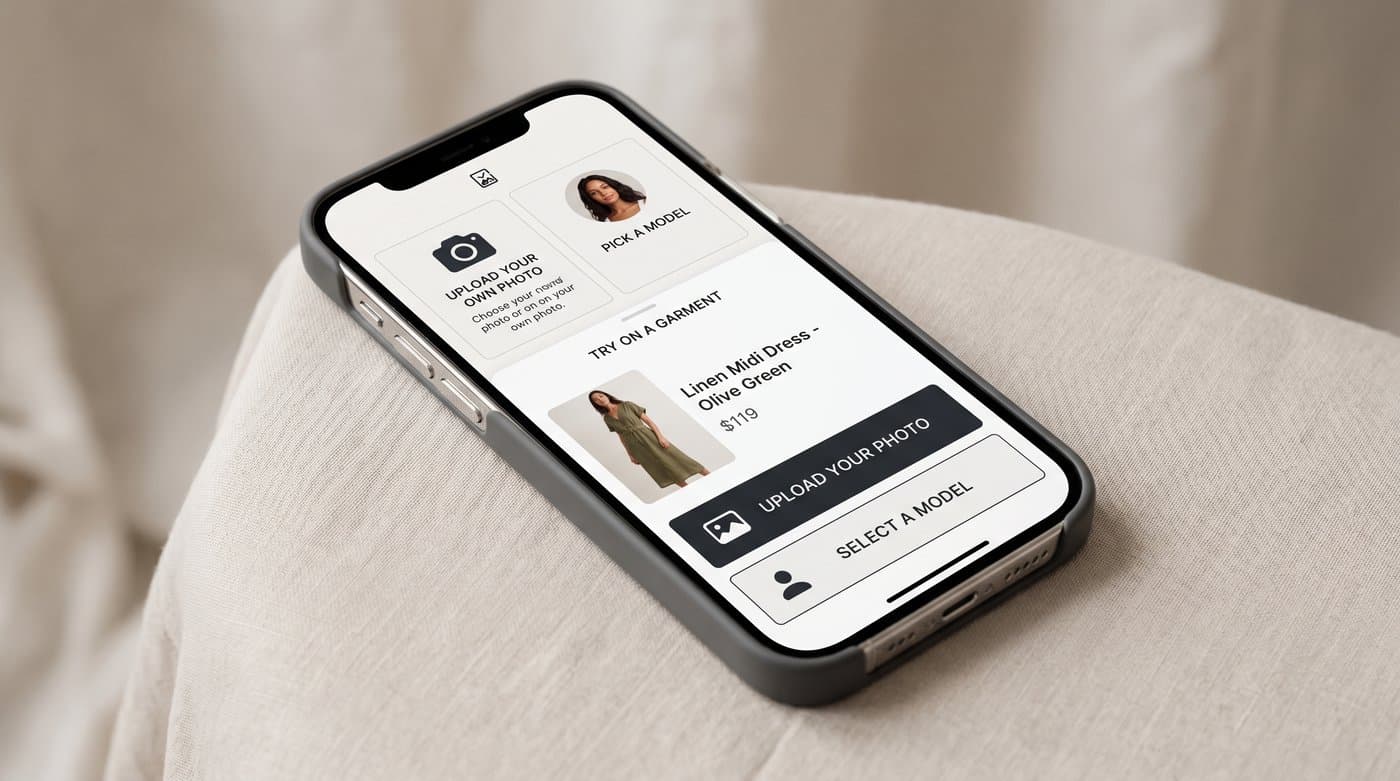
The two-path design is smart. Some shoppers happily upload a selfie, others prefer a stand-in model, and offering both removes a reason to bounce. It is the same core technology as Google's and Zara's try-on, AI generating a worn image, tuned for a large fashion catalog.
The catch: it is ASOS's app and ASOS's scale
Like the other giants, ASOS's try-on is built for ASOS. It runs in their app, on their catalog, with a platform partnership behind it. If you are an independent or mid-sized fashion store, you are not going to commission a custom AIUTA integration or ship your own app. What you can do is give your shoppers the same on-body experience through a managed widget on your existing site.
How to offer the same on your store
A hosted try-on widget puts AI-image try-on on your product page with no build. Photta installs as one tag:
<script src="https://widget.photta.app/v1.js" data-key="pk_live_..."></script>
The shopper uploads a photo and sees themselves in your garment, on your site, under your brand. It covers apparel and jewelry, runs in 29 languages, processes and deletes photos for privacy, and includes the upload and result UI out of the box. No app, no AI team, no platform deal.
Why it pays off
For a fashion store, try-on hits the two numbers that matter most. Try-on users convert at roughly 2.3 times the rate of those who do not, and try-on reduces returns by 35 to 45 percent in apparel, where size and fit drive most returns. ASOS itself has reported a meaningful drop in returns from its try-on efforts. The same mechanics work on a store a fraction of its size.

How to set it up
- Sign up at business.photta.app and start the free trial (14 days, 30 try-ons).
- Create a key, choose apparel, add your domain.
- Paste the one-line script into your Shopify, Wix, Squarespace, or WooCommerce theme.
- Brand it, and your shoppers get the on-body try-on ASOS shoppers expect.
Plans start around $49 a month for 500 try-ons after the trial.
FAQ
Sources
- Retail Technology Innovation Hub, ASOS virtual try-on with AIUTA: retailtechinnovationhub.com
- eMarketer, virtual try-on curbs returns and boosts conversions: emarketer.com
- Focal, virtual try-on in e-commerce research summary: getfocal.co
Tags
Photta
Ready to transform your product photography?
Try Photta free and see the difference AI can make for your e-commerce business. No credit card required.
Start Free Trial