
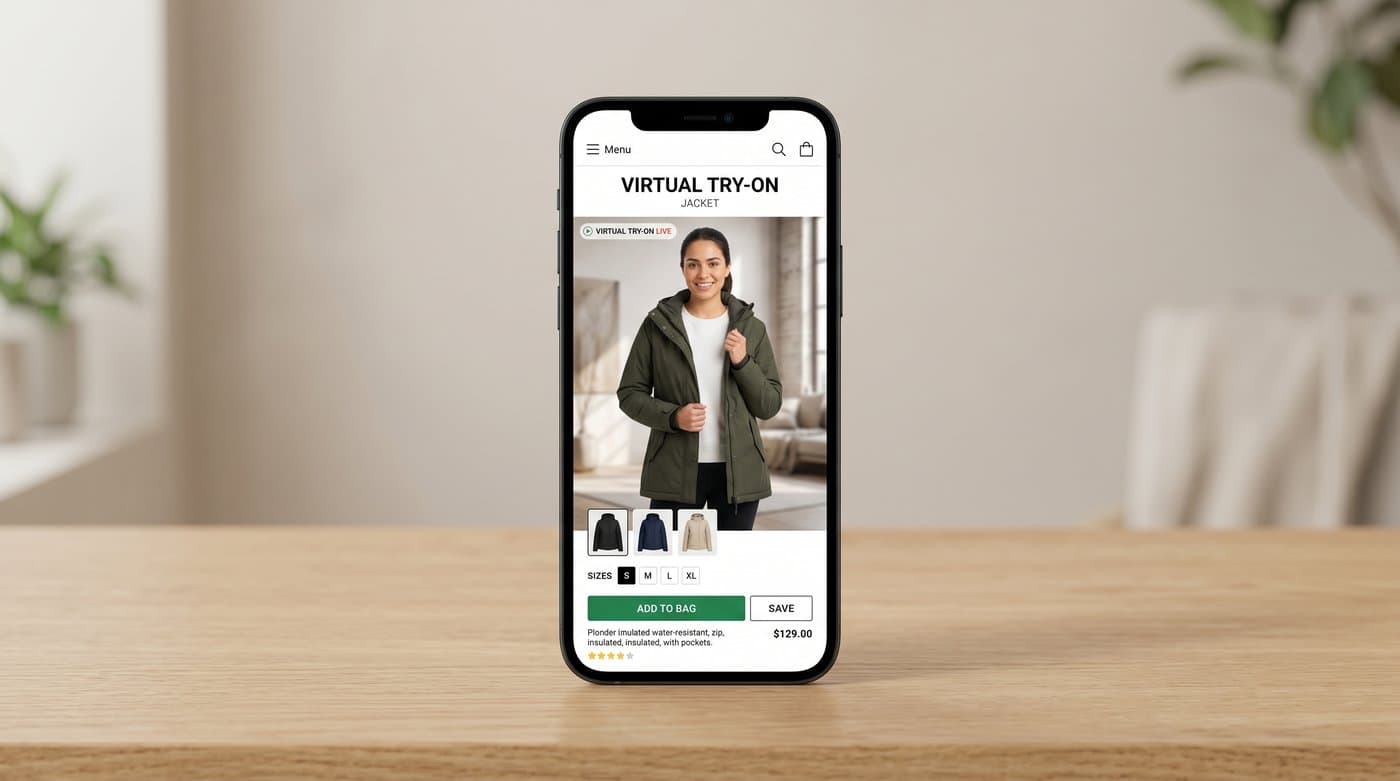
If you have shopped online lately, you have probably seen it: upload a photo, and there you are, wearing the jacket. Google, Zara, ASOS, and SHEIN have all rolled out virtual try-on, and shoppers now half expect it. The catch most store owners assume is that you need a Zara-sized budget and an in-house AI team to offer it. You do not. In 2026 you can add the same kind of try-on to your own store with one script tag and no code. Here is exactly how.
The short version: the big brands either built try-on in-house or plugged into Google. A small or mid-sized store gets there with a managed widget that drops onto your product page, keeps the shopper on your site, and runs on your brand. I will walk through what try-on is, why it moves the numbers, how the big names do it, and the no-code way to get it yourself.
What virtual try-on actually is
Virtual try-on lets a shopper see a product on a real body, theirs or a model, before buying. There are two kinds, and the difference matters when you choose a tool:
- AI-image try-on: the shopper uploads a photo and AI generates an image of them wearing the item. This is what Google Shopping, Zara, ASOS, and SHEIN use for clothing. It handles full garments and any pose.
- Live AR try-on: the phone camera overlays the product in real time, like a mirror. This works best for jewelry, eyewear, and makeup, where the item sits in one predictable spot.
For clothing, AI-image is the approach that actually reads well, which is why the big fashion names use it. If you sell apparel or jewelry, that is the lane to be in.
Why it is worth doing
Try-on is not a gimmick, it is a margin tool. Shoppers who use it convert at around 2.3 times the rate of those who do not, and well-implemented try-on shows conversion lifts of 20 to 40 percent. It also attacks returns, the quiet killer of e-commerce margins: Warby Parker reported a 45 percent drop in returns within six months, ASOS a 35 percent year-over-year drop for featured categories, and Zara a double-digit reduction in size-related returns after launching its own try-on. Demand has caught up too, with 58 percent of online fashion shoppers having used a try-on tool and 71 percent of Gen Z calling it essential to where they shop.
How the big brands do it
Three patterns cover almost everyone:
- Build it in-house: Zara built its app-based fitting room with Inditex-scale resources. Beautiful, and out of reach for most stores.
- Plug into Google: H&M, Levi's, and others appear in Google Shopping's virtual try-on. It works, but it lives on Google, not your store, and the shopper is on Google's turf, not yours.
- Use a managed widget: drop a hosted try-on onto your own product pages. This is the route that gives a normal store the same experience without the budget or the platform dependency.
The third option is the one this guide is about, because it is the only one that keeps the shopper on your site, under your brand, and within reach of a small team.
The no-code way to add it: an embedded widget
A managed try-on widget is a small piece of hosted software you place on your product page. The shopper clicks "Try it on", uploads a photo, and the AI returns an image of them in your product. You build none of it. Photta, for example, installs with a single tag:
<script src="https://widget.photta.app/v1.js" data-key="pk_live_..."></script>
That one line gives you the upload screen, the progress state, the before and after result, mobile support, 29 languages, bot protection, and privacy handling, all ready out of the box. It covers apparel and jewelry, the two categories where on-body try-on does the most work. Photos are processed and deleted, results auto-expire, and you manage everything from a dashboard.

How to set it up in practice
The flow is short enough to finish in a coffee break:
- Sign up at business.photta.app and start the free trial (14 days, 30 try-ons, no commitment).
- Create a key, choose your category (apparel or jewelry), and add your store domain.
- Paste the one-line script into your theme. On Shopify, Wix, Squarespace, or WooCommerce this is a single edit, no developer required.
- Set your product image and brand color, and you are live.
Paid plans start at about $49 a month for 500 try-ons once you outgrow the trial, which is a fraction of a single photoshoot, let alone an in-house build.

Which try-on type should you choose
Match the tool to what you sell. For clothing, use AI-image try-on, because garments drape and move in ways a live camera overlay cannot fake. For jewelry you can use either, and a generated image still reads well for necklaces and earrings on a body. What you should not do is bolt a live-AR tool meant for eyewear onto a dress and expect it to convince. If you want the full breakdown, see our guide on AI versus AR try-on for your store.
How to choose a provider
Look for four things: it keeps the shopper on your site, it installs without code, it covers your actual category, and it handles privacy and bot abuse for you. A tool that only sends shoppers to a marketplace, or that needs an engineering sprint to install, defeats the point. The whole reason to use a managed widget is to get the big-brand experience without the big-brand team.
FAQ
Sources
- Google, AI virtual try-on for Google Shopping: blog.google
- eMarketer, retailers rely on virtual try-on to curb returns and boost conversions: emarketer.com
- Focal, virtual try-on in e-commerce research summary: getfocal.co
- Baymard Institute, product page UX research: baymard.com
Companion guides
- 7 Best AI Virtual Try-On Apps for Shopify (2026)
- AI vs AR Virtual Try-On: Which Is Right for Your Store?
- Get the Virtual Try-On Zara and ASOS Have, Without Their Budget
- How ASOS's Virtual Try-On Works (and How to Offer It on Your Store)
- How Google's Virtual Try-On Works (and How to Add It to Your Own Store)
- How H&M's Virtual Try-On Works (and How Your Store Can Do the Same)
- How SHEIN's Virtual Try-On Works (and How to Add It to Your Store)
- How to Add Virtual Try-On to Your Shopify Store (No Code, 2026)
- How Virtual Try-On Fits into the Ecommerce Buying Journey
- How Zara's Virtual Try-On Works (and How to Add It to Your Store)
- What Is an AI Outfit Changer? Why It’s Becoming the New Standard in E-Commerce (2026 Guide)
- How to Use Augmented Reality for Jewelry E-Commerce (2026): The Ultimate Guide to Virtual Try-On and AI Modeling