
AI Packshot Maker:
White Background Product Photos
Upload up to four photos of one product. Get it back on pure white, evenly lit. Check each marketplace's rules for size and framing.
Use a sharp, clear photo. Free photos carry a watermark until your first purchase.
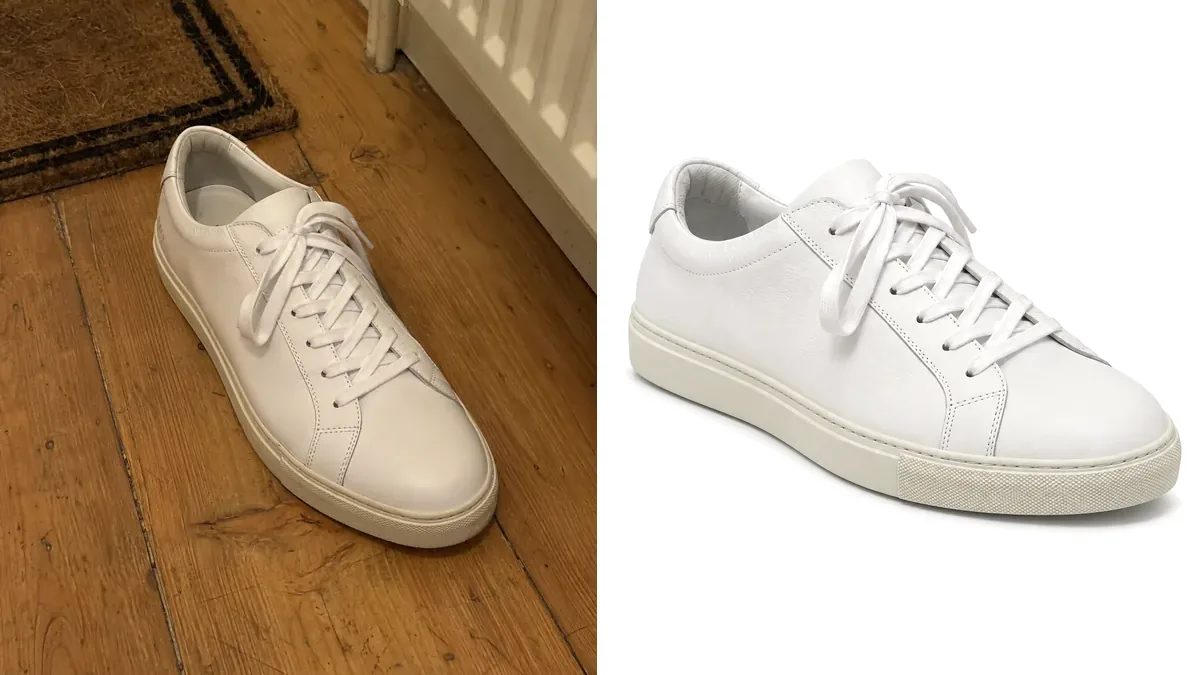
Use a sharp, clear photo. Free photos carry a watermark until your first purchase.
How to make a packshot

Upload your product
Add up to four photos of one product. A phone photo on a table is enough.

Choose pure white
Pure white for the main image. A gradient, dark or textured backdrop for a second version. Then pick the light and the ratio.

Make and download
One to four at a time. 2K, or 4K on a paid plan. The cost shows before you start. Free photos carry a watermark.

Pure white, edge to edge
A seamless white backdrop instead of your table, floor or wall. Many marketplaces ask for it on the main image.
Get Started Free
One look for every product
Same backdrop, light and ratio for every item. A whole catalog looks like one shoot.
Try It Now
More than white
The same photo also goes on a gradient, a dark or a textured backdrop, into a room, a hand or a flat lay, or onto a pedestal.
Explore Features
Which app or software for a packshot?
No single best app. A few photos: a studio or a photo editor. A whole catalog: a background remover or an AI packshot generator.
A phone, white paper and a lamp
No software needed
- Good for
- A few matte products.
- Watch out
- Paper often shoots grey. Light, edges and shadow are yours to fix.
A photo editor with layers
Adobe Photoshop, GIMP, Photopea
- Good for
- Full control of every edge and shadow.
- Watch out
- Every product is manual work. Fur, glass and fine edges take longest.
A background-remover app or website
remove.bg, Photoroom, Pixelcut, Canva
- Good for
- Fast cut-outs of simple shapes.
- Watch out
- Most change the background only. Light, shadow and crop stay as shot. Check glass and fine edges at full size.
- Good for
- Many products, one look, from your own photos. No editing skills.
- Watch out
- Compare each result with the real product: label, colour, small print.
A studio or photographer
Packshot studios and freelancers
- Good for
- Jewellery, glass, reflective or very large items.
- Watch out
- The highest price per photo, and a wait.
Kinds of tool, in general terms. The names are examples, not a ranking or a test. Read each product's own page for what it offers and costs.
More for product sellers
Guides and tools that go with a packshot.
Use Cases
Who needs a packshot
Listings, catalogs and product pages.

Marketplace sellers
The main image on Amazon, eBay or Walmart is usually the product on pure white. Check each marketplace's rules.

Online stores and catalogs
Every item on the same white backdrop, made from photos taken on a desk.

Cosmetics and beauty brands
Bottles, jars and tubes on white for the listing, on a stone plinth or a gradient for the campaign.

Bags, shoes and accessories
One clean image per colour. Same angle, same framing.

Watches and gadgets
White for the marketplace, dark with one focused light for your own page. One photo.

Home and kitchen
Mugs, lamps and cookware on white for comparison sites and marketplaces. A warm gradient for your shop.
Ready to Transform Your Fashion Business?
Join thousands of brands using Photta's AI tools
- Free to Start
- No Credit Card Required
- Cancel Anytime