

Photta
Transform Your Product Photography with AI
Join thousands of brands creating professional product photos instantly. Start free, no credit card required.
Get Started Free
Photta Team
Content Team
In 15 minutes, you'll have 10 professional, studio-quality product photos ready for your website, Amazon listing, or Instagram feed—all without hiring a photographer, renting a studio, or buying expensive lighting equipment.
Welcome to the new era of e-commerce visuals. If you have ever struggled with dull lighting, cluttered backgrounds, or the sheer expense of professional product photography, you are not alone. High-quality imagery is the lifeblood of online retail. When customers cannot touch or feel your product, your photos are the only thing bridging the gap between hesitation and a completed checkout. But traditionally, achieving that pristine, commercial look meant spending anywhere from $50 to $500 per single image.
Today, AI product background replacement changes everything. By simply uploading a photo snapped from your smartphone, you can instantly transport your product into a luxury spa, a sleek modern kitchen, or a minimalist pastel studio.
In this comprehensive tutorial, we are going to show you exactly how to achieve flawless product background replacement using Photta, the industry's leading AI-powered fashion and product photography platform. Whether you are selling skincare serums, handmade jewelry, or electronics, you will learn step-by-step how to match your exact brand aesthetic in seconds.
The Evolution of E-commerce Visuals: AI Product Photography Statistics for 2026
Before we dive into the tutorial, it is crucial to understand why this shift is happening. AI product background replacement is not just a trendy tool; it is rapidly becoming the industry standard. Brands that fail to adopt automated visual workflows are finding themselves outpaced by competitors who can test, iterate, and publish new product imagery daily.
Recent data highlights exactly how fast the landscape is evolving:
- Explosive Market Growth: According to Emergen Research, the AI photo editors market reached $2.1 billion in 2024 and is projected to skyrocket to $8.9 billion by 2034, boasting a 15.7% compound annual growth rate (CAGR).
- Unprecedented Software Adoption: In 2024, AI image editing was the fastest-growing software category globally, with an astonishing 441% year-over-year growth in utilization.
- Direct Impact on Revenue: A recent survey by EComposer revealed that 87% of retailers adopting AI in their visual workflows reported noticeable annual revenue uplifts, citing higher conversion rates on product detail pages (PDPs).
- Mainstream Integration: 80% of retail executives now expect their businesses to fully adopt AI image automation by the end of 2025.
When you replace the background of a product image with AI, you are not just saving money—you are increasing your speed to market. You can launch seasonal campaigns, A/B test different lifestyle scenes, and refresh stale listings without ever picking up a camera.
The True Cost: Traditional Product Photography vs. AI Background Generation
To fully appreciate the power of an AI product background generator, let us break down the traditional costs associated with creating high-converting e-commerce photos.
The Traditional Photo Shoot
If you want to create a suite of images for a new product line—let's say 10 "in-context" lifestyle shots and 5 crisp "studio" shots—you are looking at a massive logistical undertaking:
- Photographer Day Rate: $800 to $2,500+
- Studio Rental: $300 to $1,000/day
- Prop Styling & Set Design: $400 to $1,200
- Models (Hand models for in-hand shots): $300 to $800/day
- Post-Production & Retouching: $20 to $50 per image
- Total Turnaround Time: 2 to 4 weeks.
Total cost? Easily upwards of $3,000 for a single product line launch.
The Photta AI Solution
Now, let us look at the modern workflow using Photta's AI Product Studio:
- Location: Your desk.
- Equipment: Your smartphone to take the base photo, and your web browser.
- Turnaround Time: 30 seconds per generation.
- Cost: 5 credits per generation (yielding 2 high-resolution variations for 10 credits). With Photta's affordable subscription plans, the cost per image drops to mere pennies.
Instead of waiting weeks for retouched files, you can generate hundreds of variations in a single afternoon. You can test a moody, dark-academia aesthetic for a winter campaign, and instantly switch to a bright, sun-drenched beach scene for summer—all using the exact same base photo.
What You Need to Get Started
Ready to transform your product visuals? The barrier to entry has never been lower. Here is exactly what you need to follow along with this tutorial:
- Your Tool: An active account on Photta (Start with the free trial if you haven't already).
- Your Asset: A clear, reasonably well-lit photo of your product. (You do not need a transparent PNG; Photta's AI will automatically detect and remove the background for you).
- Your Vision: An idea of your brand aesthetic (e.g., "minimalist marble," "neon cyberpunk," or "warm bohemian").
- Estimated Time: ~20 minutes to master the entire workflow.
PhottaFollow Along FreeStart Free Trial
Step-by-Step Guide: How to Replace the Background of a Product Image with AI
Follow these precise steps to harness the power of Photta's AI Product Studio. We will walk through the exact user interface actions, ensuring you get flawless results on your very first try.
Step 1: Upload Your Product Photo
The foundation of a great AI-generated image is the source file. While Photta's AI is incredibly advanced, giving it a clear starting point ensures the best edge detection and lighting integration.
- Log into your Photta dashboard and navigate to the AI Product Studio.
- Click the large Upload Image button in the center of the workspace.
- Select the raw photo of your product.
Pro Tip for the Perfect Source Image: You do not need professional lighting, but you should avoid harsh, multi-directional shadows. Place your product near a window for soft, natural, diffused light. Ensure the entire product is in the frame and in focus. Photta's background remover will automatically strip away your living room table or office desk, isolating the product perfectly.

Step 2: Select Your Preferred Photography Workflow
One of the biggest advantages of Photta is its understanding of commercial photography styles. Unlike generic image generators, Photta offers five distinct, specialized workflows tailored for e-commerce.
Select the workflow that best fits your immediate marketing goal:
1. Studio Shot Perfect for Amazon listings, Shopify product pages, and technical spec sheets. This workflow generates clean, distraction-free backgrounds (think pure white, soft grey, or pastel gradients) with perfect studio lighting, soft drop shadows, and subtle reflections. It keeps the absolute focus on your product's details.
2. In-Context (Lifestyle) This is where the magic of AI background replacement shines. The In-Context workflow places your product into a realistic environment. Selling a coffee mug? Place it on a rustic wooden table next to a newspaper and morning sunlight. Selling a hiking boot? Place it on a mossy rock with a misty mountain backdrop. This builds the emotional connection that drives sales.
3. In-Hand Hand models are notoriously expensive. The In-Hand workflow is specifically engineered for cosmetics, skincare, small electronics, and beverages. Photta seamlessly generates ultra-realistic hands holding or interacting with your product, instantly providing a sense of scale and human touch.
4. Flat Lay Flat lays are the king of Instagram and Pinterest. Ideal for clothing, cosmetic palettes, and stationary. Photta simulates a top-down camera angle, arranging your product on a beautifully textured surface surrounded by thematic, AI-generated props.
5. Pedestal The hero shot. The Pedestal workflow places your item on a 3D podium, plinth, or geometric block. This elevates the perceived value of the product, making it look premium, luxurious, and highly desirable. It is the go-to choice for luxury skincare, perfumes, and high-end tech gadgets.

Step 3: Dial in Your Customization and Brand Aesthetic
Once you have selected your workflow, it is time to customize the scene. This is how you ensure the AI product background generator produces images that look like your brand, not a generic template.
- Choose Backdrops and Scenes: Scroll through Photta's extensive library of environments, or use the prompt box to type exactly what you want (e.g., "Sunlit bathroom counter with terrazzo tiles and a monstera plant in the background").
- Select Surfaces: Decide what your product is sitting on. Options range from polished marble and distressed wood to reflective glass and rippled water.
- Set the Mood and Lighting: E-commerce lighting is crucial. Choose 'Morning Sunlight' for long, dramatic shadows, 'Studio Softbox' for even, clinical lighting, or 'Neon Cyberpunk' for edgy tech products.
- Upload Reference Images (Crucial for Brand Consistency): If your brand has a specific visual identity, you can upload a reference image. Photta's engine will analyze the color grading, texture, and overall vibe of your reference, ensuring your new product photos perfectly match your existing website aesthetics.
Pro Tip for Advanced Prompting: Be specific about materials and lighting in your text prompts. Instead of "a table," use "a weathered oak wood table with dappled sunlight filtering through window blinds." The AI thrives on rich, descriptive adjectives.
Step 4: Generate and Review Your Professional Photos
You have set the stage. Now, let the AI do the heavy lifting.
- Click the Generate button.
- Wait approximately 30 seconds. During this time, Photta's cloud-based engine is analyzing the 3D geometry of your product, rendering the new background, matching the lighting on your product to the lighting in the scene, and generating realistic cast shadows.
- Review your outputs. Every generation costs just 5 credits and typically provides 2 stunning, high-resolution images (10 credits total).
- Download your favorites, or tweak the prompt and generate again to explore new creative directions.

Common Mistakes to Avoid in AI Product Background Generation
While AI makes the process incredibly simple, beginners often make a few predictable mistakes that result in photos looking "fake" or unpolished. Avoid these common pitfalls to ensure your results always look like a $1,000 agency photo shoot.
1. Poor Lighting on the Original Source Image
The Mistake: Taking a photo of your product in a dark, yellow-lit room with harsh flash, and then asking the AI to place it in a bright, sunlit beach scene. The Fix: The AI tries to match lighting, but it cannot completely rewrite the hard shadows baked into your original photo. Always take your base photo in soft, even, neutral light (like near a window on an overcast day).
2. Cluttered Edges and Cropped Products
The Mistake: Uploading a photo where the edge of the product is cut off by the frame, or where your fingers are wrapping over the front of the product. The Fix: Give the product breathing room. Ensure the entire silhouette is visible. If you need to hold the product to take the photo, hold it from the very bottom or the back so your fingers don't obscure the shape.
3. Mismatched Perspectives
The Mistake: Taking a photo of your product straight-on (eye level), but selecting the "Flat Lay" (top-down) workflow in Photta. The Fix: Match your camera angle to your desired output. If you want a top-down flat lay, take the original photo from above. If you want a pedestal hero shot, shoot from a slightly lower angle to make the product look imposing and grand.
4. Forgetting Brand Consistency
The Mistake: Generating 10 different photos with wildly different lighting, colors, and vibes, resulting in a chaotic Instagram feed. The Fix: Create a "Brand Prompt Formula." Once you find a background style you love, copy the exact prompt and settings you used. Use Photta's reference image feature to lock in your brand colors across all future generations.
PhottaTry It FreeStart Free Trial
The Result: Witnessing the Before and After Transformation
The true power of an AI product background generator is best understood when you see the transformation side-by-side.
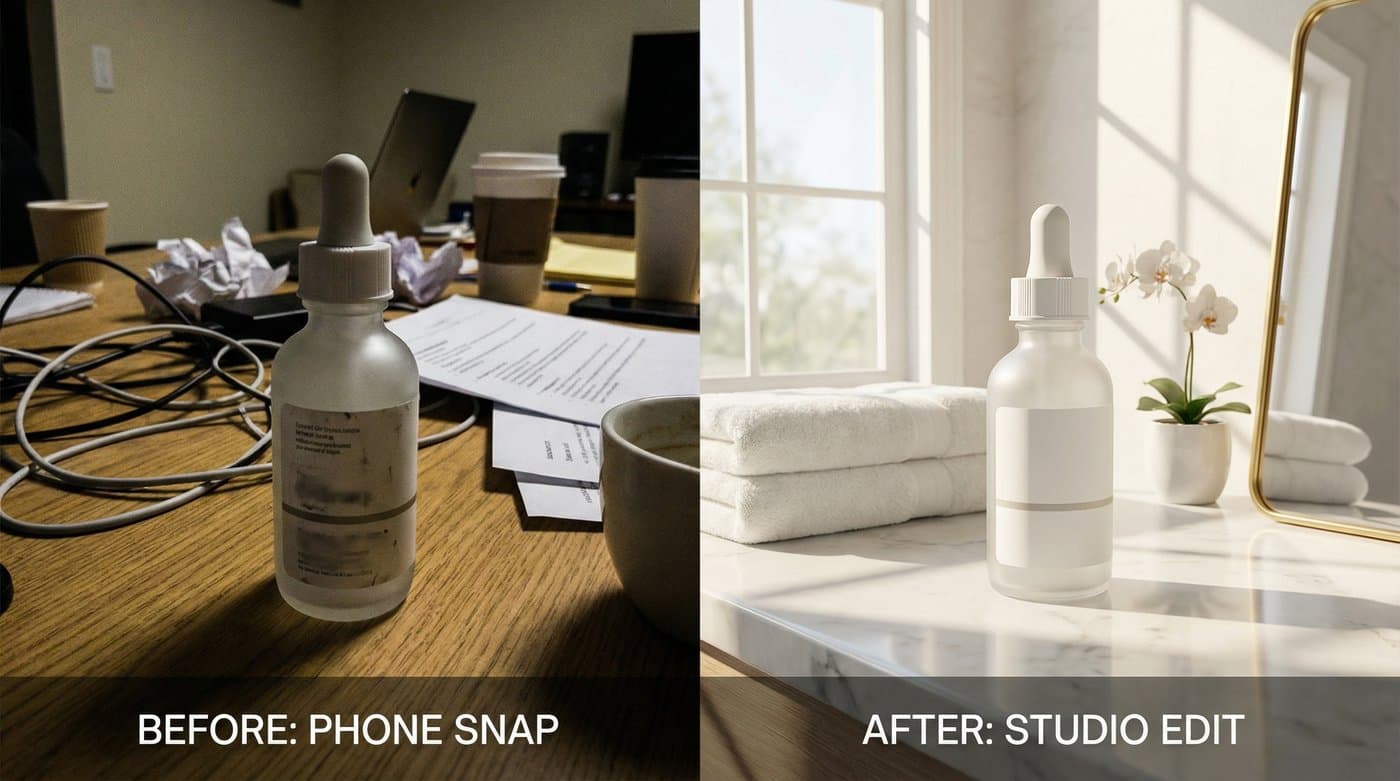
Imagine you sell a boutique line of organic face oils. Your "Before" image is a quick snapshot taken on a cluttered desk. The lighting is dull, there is a coffee cup in the background, and the product looks amateurish.
After uploading it to Photta and spending 30 seconds applying the In-Context workflow with a prompt for "a marble bathroom counter, eucalyptus leaves, morning sunlight, soft luxury aesthetic," the "After" image is breathtaking.
The AI has perfectly silhouetted the glass bottle. It has recognized the transparency of the glass and accurately refracted the new marble background through the liquid. It has cast a long, realistic morning shadow across the counter, and carefully placed out-of-focus eucalyptus leaves in the foreground to create depth of field.
What was once an unusable snapshot is now a high-converting hero image ready for a Facebook ad campaign.

Going Beyond the Basics: Advanced Techniques with Photta
Once you have mastered the basics of product background replacement, Photta offers an entire ecosystem of advanced AI tools designed to take your e-commerce visuals to the enterprise level.
Scale Your Visuals with Batch Processing
If you have a catalog of 500 products, doing them one by one is tedious. Utilize batch generation concepts by standardizing your prompts. You can feed your entire inventory into a consistent "Studio Shot" workflow to ensure every single thumbnail on your Shopify store looks identical, creating a highly trusted, premium shopping experience.
Leverage AI Clothing Try-On & Model Maker
If you sell apparel, flat lays and ghost mannequins are just the beginning. Photta's revolutionary AI Clothing Try-On feature allows you to transform standard ghost mannequin photos into stunning on-model photography.
Take it a step further with the Model Maker (costing just 4 credits). You can design custom AI models by specifying age, ethnicity, body type, and facial structure. This allows you to showcase your clothing on a diverse range of models without ever casting or booking talent, ensuring your brand resonates with every demographic.
Niche Workflows: AI Jewelry Try-On & AI Shoe Studio
Jewelry and footwear are notoriously difficult to photograph due to reflections, sizing, and intricate details.
- AI Jewelry Try-On: Features specialized models designed specifically for necklaces, earrings, and rings, focusing heavily on neck, ear, and hand details to ensure the jewelry sparkles perfectly.
- AI Shoe Studio: Offers dedicated workflows like 'On-Foot' (with gender selection), 'Floating,' and 'Lifestyle' to ensure sneakers and heels look dynamic and perfectly proportioned.
Maximize Quality with AI Upscale
E-commerce platforms increasingly demand high-resolution imagery for zoom features. Once you generate your perfect product background, use Photta's AI Upscale tool to enhance the image resolution by 2x to 4x. This proprietary upscaling doesn't just stretch the image; it intelligently rebuilds missing pixels, ensuring labels, textures, and fine details remain razor-sharp even on 4K monitors.

Conclusion & The Future of Your Brand's Visuals
The landscape of digital retail has shifted permanently. The days of accepting mediocre product photography because you "don't have the budget" are over. AI product background replacement levels the playing field, giving small business owners, boutique sellers, and solo entrepreneurs access to the exact same visual quality as multi-million dollar global brands.
By incorporating Photta's AI Product Studio into your daily operations, you are doing more than just saving thousands of dollars on photography equipment and studio rentals. You are unlocking infinite creative freedom. You can respond to cultural trends instantly, launch seasonal promos with bespoke imagery, and dramatically increase your conversion rates through visual storytelling.
The best part? You don't need a degree in graphic design or years of Photoshop experience. If you can take a photo on your phone and type a sentence describing what you want, you can create breathtaking commercial art.
Stop letting poor visuals hold back your amazing products. Transform your e-commerce store today.
PhottaStart Free TrialStart Free Trial
Tags
Photta
Ready to transform your product photography?
Try Photta free and see the difference AI can make for your e-commerce business. No credit card required.
Start Free Trial